


K–5 STEM and Career Exploration
Around the Neighborhood with Evo
Created in partnership with Ozobot, Around the Neighborhood with Evo is a self-paced K–5 STEM kit where learners build working circuits like a lineman, test water like an environmental scientist, and code Evo, a tiny robot, to make deliveries and rescue a kitten from a tree.
No coding experience is needed. Step-by-step guides, standards-aligned lessons, and every hands-on material are included, so you can open the box and go.
Around the Neighborhood with Evo requires an Ozobot Evo robot. A robot is not included in the kit. Add one below, or choose Not included if your school already has Evos.
Around the Neighborhood with Evo
The short version
Three things to buy, and what is in each
The kit and the robot are separate purchases, and the teacher materials are their own box. Pick a tab to see what each one holds.
Student Kit
$300 · serves up to two students
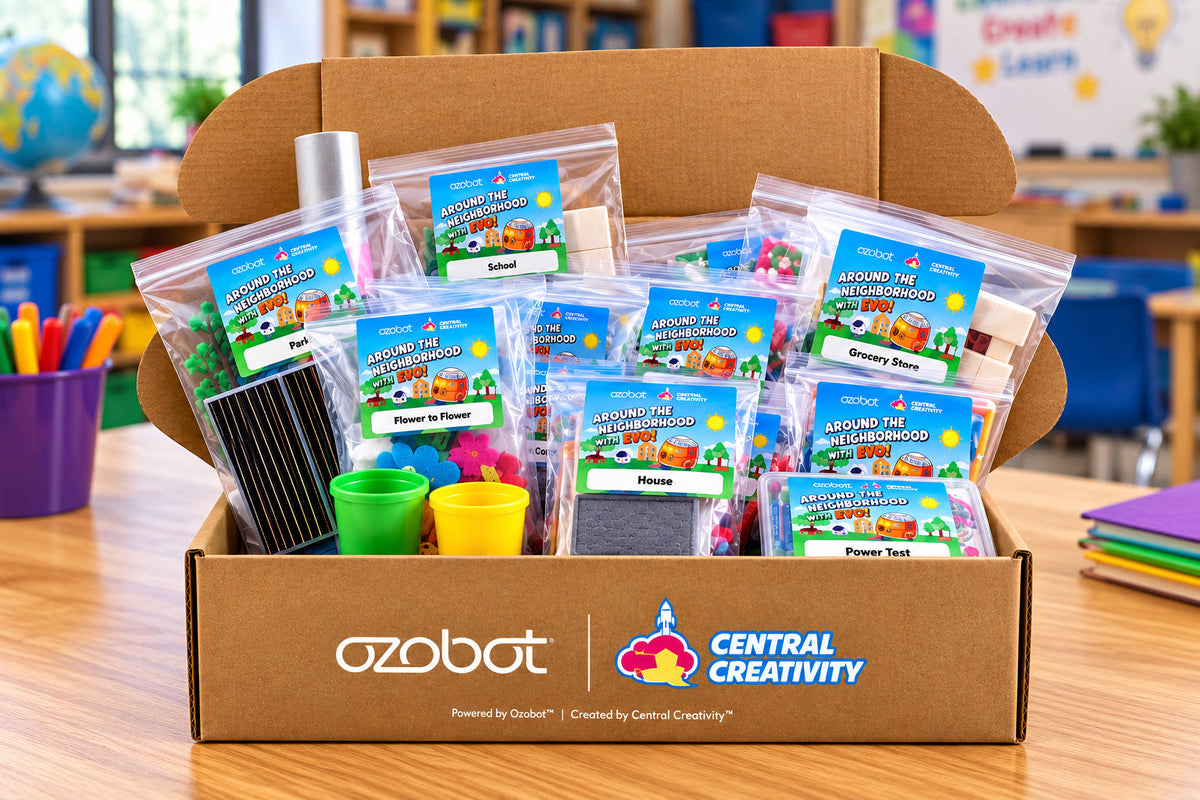
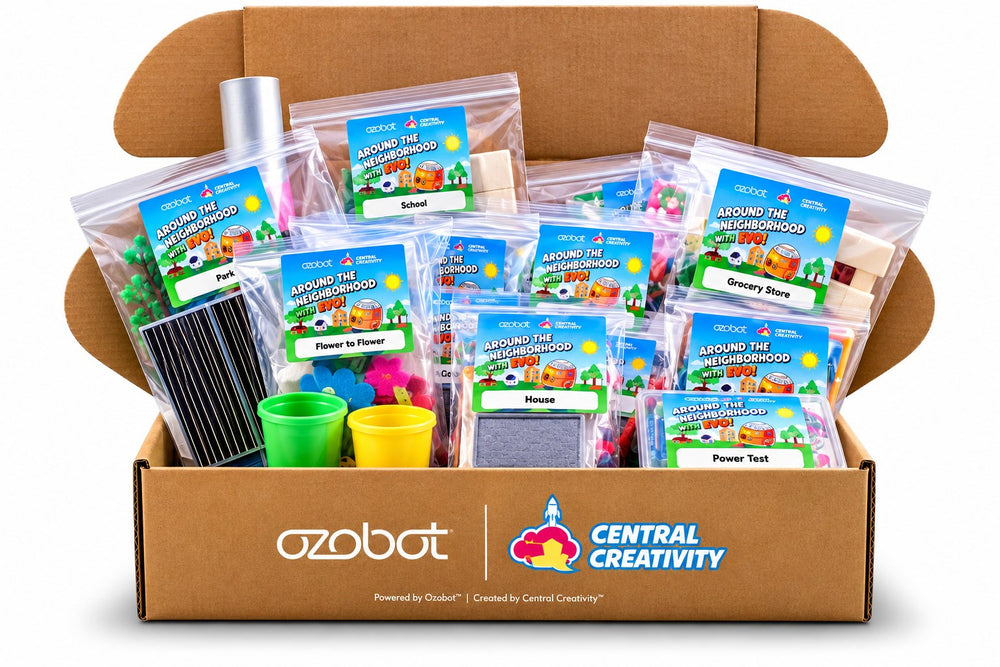
- Materials for 20+ STEM activities
- Printed instructional guide
- Five story-driven learning modules
- Step-by-step activity instructions
- Reflection prompts and discussion activities
- Career connection exploration activities
No robot in this box. Evo is required and is sold separately. Add one above, or choose Not included if your school already has them.
Teacher Resources
$100 on its own · $400 with a Student Kit
- Teacher Guide with implementation tips and differentiation strategies
- Teaching tools and extension resources
- Access to the digital resources
- Color Code chart for screen-free coding
- The module supply packets: bee vision glasses, welding lens, fluorescent and UV flashlight, modeling dough, large flower cutouts and the Circuit Stick
One teacher box supports a room of student kits. Buy it on its own if your students already have theirs, or choose Teacher Resources + Student Kit to start from nothing.

The Evo Robot
From $175 · sold by us, made by Ozobot
Evo is the palm-sized robot the whole program runs on. Students drive it by drawing Color Codes in marker, with no screen at all, and can move on to programming it in Ozobot Blockly when they are ready.
- Optical sensors to read Color Codes, and proximity sensors to see what is in the way
- LED lights and a built-in speaker, both programmable
- Bluetooth Low Energy, with about thirty feet of range
- Polycarbonate shell and a rechargeable battery, about an hour to charge
Entry Kit, $175. One Evo, a charging cable, five dual-tip Color Code markers, the Get Started activities and a protective zip case.
Classroom Kits. Six bots for $999, twelve for $2,050, eighteen for $2,990, each with matching marker sets, charging hardware and the sticker packs.
Ari runs this program too. Ari is the step up for older students.


K–5 STEM and Career Exploration · Powered by Ozobot
Curiosity starts around the neighborhood.
Each module introduces the people who keep a neighborhood running, from delivery drivers and welders to linemen, beekeepers, and lab techs. Learners build, test, and troubleshoot the way these professionals do. As a result, they begin to see their neighborhood as a system, and a ride down the street turns into a conversation about the jobs they spot and the careers they could have one day.
- 5themed modules
- 25standards-aligned lessons
- 20+hands-on activities
- 0activity materials to source
Created by Central Creativity. Powered by Ozobot.
Who it’s for
Built for classrooms and homes
Created in partnership with Ozobot, one kit works for a teacher leading a class or a family learning together at home.
In your classroom
- No prior coding or robotics experience needed. Step-by-step lessons, instructional videos, and ongoing educator support help any teacher lead STEM, coding, and robotics with confidence.
- Standards-aligned lessons. Every lesson is aligned to NGSS, with Common Core math and ELA connections, and the program builds ISTE, Career Ready, and social-emotional skills.
- Two ways to code. Learners draw Color Codes with markers for screen-free coding, or use Ozobot’s online block editor on any device.
- Workforce starts here. Each module introduces the people who keep a neighborhood running, so learners see themselves in future careers as early as kindergarten.
- Teach it on your schedule. Complete one module a day, a week, or a month, or spread all 25 lessons across the full school year.
For your child
- Hands-on coding, screens optional. Learners code Evo by drawing Color Codes with markers, and online block coding is there whenever they are ready.
- More than coding. Lessons combine hands-on STEM builds, robotics, and real career connections, so learners see how STEM shapes the world around them.
- Real questions, real answers. How do road crews repair a pothole? Who keeps the lights on in our neighborhood? What does a lab technician look for under a microscope? Learners discover the STEM behind everyday jobs.
- No coding experience needed. Step-by-step guides and instructional videos walk you through every lesson, so you can teach it with confidence from the very first day.
- Fits any schedule. Explore a module a day, a week, or a month, with every lesson and hands-on material ready when you are.
How it works
Four steps to every lesson
Every lesson follows the same simple pattern, so learners know what to expect and grow more confident each time.
- 1
Meet a helper
Learners meet a real community helper, from road crews and linemen to beekeepers and lab technicians.
- 2
Ask questions
Evo asks a question that gets learners thinking about how that helper uses STEM on the job.
- 3
Complete a challenge
Learners build, test, and code Evo to solve a real neighborhood problem.
- 4
Reflect and record
Learners record what they observed and share what they learned by drawing, writing, or talking it through.

The program
Five modules, twenty-five career-connected lessons
Click any module to see its five lessons.
Module 1Who Keeps Us Moving?Transportation & Logistics · 5 lessons

- Meet Evo
Robots have physical parts, called hardware, that let them sense, move, and interact. Learners find each part on Evo and discover what it does.
- Evo’s Road Test
Robots use sensors and programmed instructions to detect lines and follow commands. Learners calibrate Evo, test how it handles different paths, and steer it with Color Codes.
- Paint the Path
Road markings guide movement and keep people safe. Learners build their own paint marker, draw a path, and test whether Evo can follow it, just like a road-marking professional.
- Box It Up
Packaging has to fit an item and protect it in transit. Learners make their own paper and design packaging that keeps their item safe.
- Special Delivery
Delivery systems run on planning, sorting, and routes. Learners program Evo to follow a path and deliver a package to a specific address.
Module 2Who Builds and Repairs?Construction & Engineering · 5 lessons

- Speed It Up
Coded instructions can change how a robot moves, including how fast. Learners use Color Codes to control Evo’s speed along a path.
- Strong Connections
Structures are often built in modules so they can be carried in, assembled, repaired, and added to later. Learners connect modules into a shelter that can grow as needs change.
- Weld Check
Welders join metal into a bond strong enough to hold a structure. Learners repair a structure like a welder, then program Evo to inspect each connection, using Speed Color Codes to slow down at every inspection point.
- Road Repair
Potholes make roads unsafe for drivers. Learners work like a road maintenance crew, mixing plaster and paint to fill the potholes in the road.
- Tune-Up Time
Machines need regular maintenance to stay safe and efficient. Learners program Evo to drive into the repair shop for a vehicle tune-up.
Module 3Who Powers Our Neighborhood?Energy & Technology · 5 lessons

- Evo’s Special Moves
A robot follows programmed instructions to perform set movements. Learners use Color Codes to test and observe each of Evo’s moves.
- Power Test
Electricity flows through a circuit, and materials either carry that flow or block it. Learners build and test a working circuit to light a bulb, and when it does not light, they troubleshoot like an electrician.
- Maintenance Bot
Power systems need inspection to stay safe and working. Learners program Evo to inspect and maintain a power line, just like a lineman.
- Solar Helicopter
Solar panels turn sunlight into electricity, a renewable energy source. Learners build a sunlight-powered helicopter.
- Fully Charged
Electric vehicles run on stored electrical energy instead of fuel. Learners program Evo to drive to a charging station and recharge.
Module 4Who Cares for Nature?Environment & Ecology · 5 lessons

- Turn by Turn
A robot can be told which way to go at a junction. Learners use Color Codes to control how Evo turns at each intersection.
- Water Detectives
Water gets tested to make sure it is safe, and pH measures how acidic or basic it is. Learners test and compare the pH of several water samples, just like an environmental scientist.
- Water Patrol
Stormwater runs across surfaces and carries pollutants into streams. Learners program Evo to visit each site and collect water samples.
- Flower to Flower
Pollination moves pollen between flowers so plants can grow and reproduce. Learners model pollination and watch water travel through a plant.
- Busy With Bees
Bees gather nectar and pollen, pollinating as they go and making honey along the way. Learners assemble a beehive box and program Evo to inspect each hive, just like a beekeeper.
Module 5Who Keeps Us Safe and Healthy?Health & Emergency Response · 5 lessons

- Blockly Basics
Block-based coding builds instructions out of visual blocks. Learners assemble and test programs in Ozobot’s online editor to drive Evo.
- Lab Sample Slime
Lab technicians use careful observation to study samples that help doctors care for patients. Learners make slime and observe it like a lab tech, testing what happens when they stretch it slowly, stretch it quickly, and roll it into a ball.
- Emergency Response
Emergency systems get people to care safely and fast. Learners build an ambulance and a hospital, then program Evo to drive the ambulance from the house to the hospital.
- UV Print Lab
Medical imaging shows the inside of a body without surgery. Learners mix their own photochemical solution, expose it to sunlight, and read their print like a radiology tech reading an X-ray.
- Kitten Rescue
Responders use tools and teamwork to reach people and animals in trouble. Learners build a fire engine and program Evo to rescue a kitten from a tree.
Inside the kit
Open the box and go
Every hands-on material is included. Online block coding is optional and needs a computer with internet access, so learners can code completely screen-free if you prefer.
In every kit
- Five themed modules with 25 lessons
- 20+ grab-and-go activities with every hands-on material
- Reusable neighborhood mat
- Full-color printed and digital student guide
- Instructional videos for every activity
- Access to digital resources
Choose a Teacher Kit or a Student Kit, each available with or without Evo, powered by Ozobot. The Teacher Kit adds the teacher guide, a magnetic mat, and additional teaching resources. Up to two students may share a Student Kit.

Choose your kit
Pick the kit that fits
The Student Kit has everything learners need to build, code, and explore. The Teacher Kit has everything you need to lead them, no experience required. Both come with or without Evo, so you only buy what you need.
Student Kit
$300
or $475with an Evo Entry Kit
- Five modules, 25 lessons
- Full-color printed and digital student guide
- Every hands-on material
- Reusable neighborhood mat
Up to two learners may share a kit.
Choose this optionTeacher Resources
$100
or $275with an Evo Entry Kit
- Full-color printed and digital teacher guide
- Magnetic mat
- Additional teaching resources
Everything the teacher needs to instruct and guide learners as they work through their kits. Added to a Student Kit, not instead of one.
Choose this optionRobot Only
$175
- One Ozobot Evo
Sold as the Evo Entry Kit on the Ozobot Evo page.
See the Evo
Resources
See the details
Everything you need to review the program, plan your lessons, or share it with your school or funders.
Product Overview Sheet
The program at a glance, including the five modules, how it works, and what is in the kit.
OpenImplementation Guide
Four pacing options, what is inside the kit, sample lesson pages, and teacher support.
OpenScope and Sequence
All 25 lessons with their NGSS, Common Core math, and Common Core ELA standards, plus other alignments.
OpenNGSS Standards Alignment
A lesson-by-lesson look at the phenomenon, what learners do, and the standards each lesson meets.
OpenNext steps
Ready to explore the neighborhood?
We’re here to help you get started.
- See it in action. Book a live or virtual demo.
- Review the materials. Request sample teacher and student lessons.
- Explore funding. Find funding options or request a quote.
Schedule a demoFunding and grantsBuy the kit
Questions? Call 866-381-1760 to talk with our team.